Support Note: Verifying a Siemens EDA PADS or HyperLynx Installation on a Windows OS computer
OD-00089-S
V1.0
If you have already installed either or both of Siemens EDA’s PADS or HyperLynx software, you can run a verification of your installation by doing the following.
From your Windows desktop, go to Start Menu | Siemens | Siemens Install.
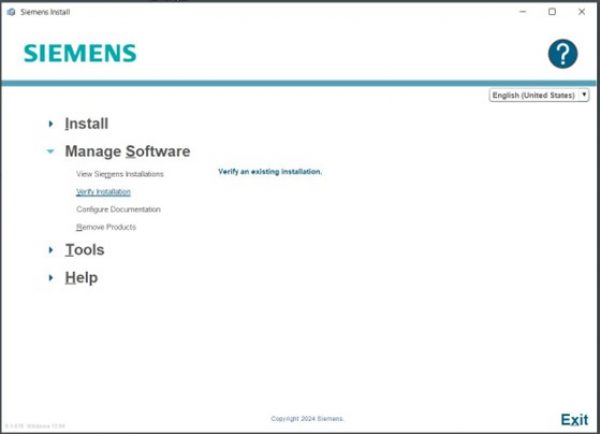
A GUI opens, as shown in in Figure 1. Select the option Manage Software | Verify Installation.
Figure 1: The Verify Installation Option
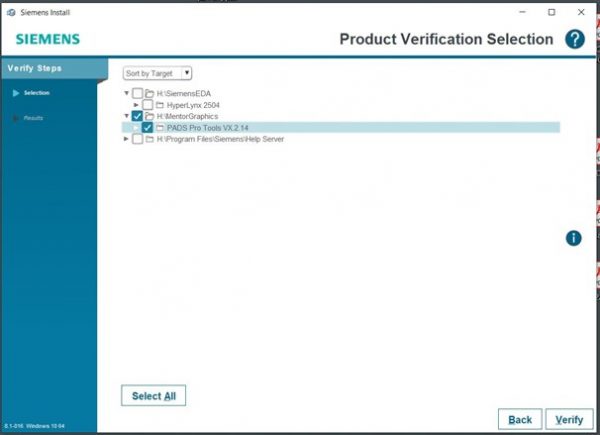
Select the tool(s) to be tested, and click the Verify button, and shown in Figure 2.
Figure 2: Choose the Software Installation to be Verified
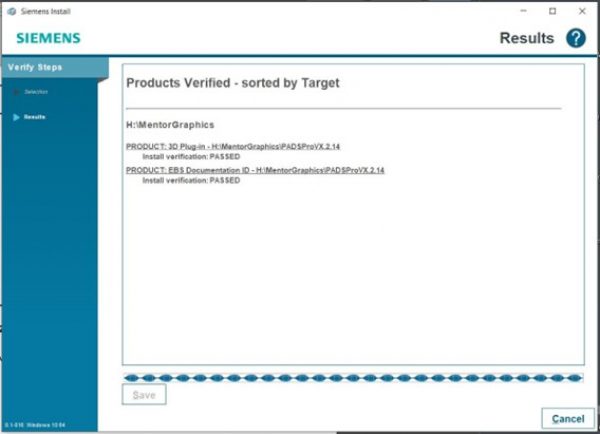
Once the checks have completed, results will be posted to in the GUI, as shown in Figure 3.
Figure 3: Results of Verification Checks
This results list may be saved as an *.html file for viewing outside of the verification program.