ANSYS Electronics Desktop – Preferences
If you open up ANSYS Electronics Desktop and you do not see the option to import HFSS, you may need to change your Preferences.
ANSYS Electronics Desktop – Preferences Read More »
If you open up ANSYS Electronics Desktop and you do not see the option to import HFSS, you may need to change your Preferences.
ANSYS Electronics Desktop – Preferences Read More »
In Ansys SpaceClaim, if you get the error “Graphics is not available”. Go to File – SpaceClaim Options Go to Advanced Settings – Graphics and change the Renderer to “Warp” as below.
How to Fix Ansys SpaceClaim Graphics Error Read More »
First, make sure that you have a CMC account and that you are linked to your supervisor. Check to make sure that you have a registered computer username. See Computer Username Issues. Make sure that you have logged into the AppGate SDP and that you have selected the tool in CADpass Client. See FAQ for CADpass Client.
What if I Can’t Get a License? Read More »
Selecting a Username To obtain a license, you must first register your computer username on the machine you are using. To be accepted as valid, your computer username must: Be unique within the CMC system Not contain a blank space Not be on the following list: admin, administrator, cmcmgr, guest, owner, root, student, super, sysadm, systems, temp, user Registering
How to Obtain a CAD Tool License Read More »
December 22, 2020: CMC Microsystems, manager of Canada’s National Design Network® (CNDN), and a leading technology and innovation support organization in Canada, has completed an extensive series of virtual roundtable meetings with 35 universities and colleges.
CMC Microsystems Wraps up Virtual Roundtable Tour of Canadian Universities and Colleges Read More »
December 21, 2020: CMC Microsystems, manager of Canada’s National Design Network® (CNDN), and a leading technology and innovation support organization in Canada, is pleased to announce the appointment of new members to its Board of Directors.
CMC Microsystems Announces New Appointments To Board Of Directors Read More »
CMC SFTP server is used for file exchange between CMC and users. Server information Host: sftp.cmc.caUsername: Your CMC registered username (your email address)Password: your CMC login password Security: CMC SFTP server has enhanced security policy. You should know your username and password for login. The server will block your IP address if you failed login 5
CMC SFTP instructions for users Read More »
For All Operating Systems If CADpass AppGate “Connection Failed” Browse to https://time.is/ to rule out any potential time sync issue on your machine. Your system has to Automatically Sync with the internet to have the correct time zone, date and time. If Asked to Use a Profile Link Triple-click to copy the link
FAQ for CADpass Client Read More »
During March and April 2018, CMC organized several one-day interactive seminars to explore research infrastructure requirements for heterogeneous computing implementations from small, low power sensor nodes, to network edge devices to the cloud. Specific infrastructure topics included needs and specifications for tools and platforms for: Application-Specific Instruction Set Processors (ASIPs) and hardware accelerators Open-source processor
Below are some facts/tips to setup and start using the HP Z400 workstations which are being delivered for use with several FPGA development systems (Xilinx ML605, Altera DE4-530, BEEcube BEE3). We will add details as queries arise, but feel free also to comment on this document to ask any specific questions. The workstations are dual
Setup Information for the HP Z400 workstations (ML605, DE4-530, BEE3) Read More »
Table of Contents Introduction CMC cloud design environments are virtual on-demand secure design environments. These environments include CAD tool suites and can host Process Design Kits (PDKs). This document guide you to use CMC cloud where you can perform your research. Accessing CMC cloud Access to CMC cloud is included with many of the CAD Tools available
Using CMC Cloud Design Environment – Windows Read More »
If CADpass doesn’t launch, it might be running in the background. Go to your bottom taskbar, by clicking on the triangle in the bottom right corner.
What to Do if CADpass Does Not Launch Read More »
After installing the new version of CADpass, I no longer have an icon on my desktop or the icon on the desktop doesn’t work. How do I fix that? (To remove a java web start cached apps). 1. Go to the Windows Control Panel – and open the Java Control Panel. 2. Click Settings. 3.
How to Remove the AppGate Icon from Your Desktop (to remove java web start cached apps) Read More »
End user upload and download file instruction Windows user: To connect to SFTP server from a Windows system, the user must use a SFTP client software. i.e. FileZilla, MobaXterm, WinScp, etc. This is free software that you can download from the Internet. Host: sftp://cmc-fab-01.cmc.ca (make sure you copy this url) Username: your CMC registered username Password: your CMC login
How to SFTP with CMC to Upload a Video for Symposium Read More »
Table of Contents Introduction CMC Microsystems provides a variety of virtual, on-demand, and secure cloud-based design environments. This set of environments includes CAD tool suites, Process Design Kits (PDKs), and an FPGA/GPU cluster. The FPGA/GPU cluster is specifically configured to enable research and development in the area of heterogeneous computing and machine learning acceleration using
Quick Start Guide: Remote Access to the FPGA/GPU Cluster Read More »
Table of Contents Our subscribers are able to use our virtual Linux Cloud (VCAD) accounts hosted here in Kingston, Ontario, if they do not have access to certain CAD tools at their home universities. Figure 1 shows the CMC Microsystems’ Cloud account hardware configuration. These accounts have recently been assigned additional master disk space for
Setting the Temporary/Scratch Directory for Ansys Simulations (CMC Cloud) Read More »
Introduction CMC cloud VCAD instances are virtual on-demand secure design environments based on the Linux operating system. These environments include CAD tool suites and can host Process Design Kits (PDKs). This document is a guide for you to use the CMC cloud in which you can perform your research activities. Accessing CMC VCAD cloud Access
Quick Start Guide: Using CMC Cloud VCAD Design Environments Read More »
This guide is intended to be used to help researchers become familiar with the Fluke 294 quickly by generating four 20 MHz sine waves with a phase difference of 0, 90, 180, and 270 degrees and an amplitude of 3 Vpp. It assumes the user has the machine in front of them, and the first
Quick Start Guide: Generating Sine Waves on Fluke 294 Read More »
Description COMSOL Compiler works with Application Builder in COMSOL Multiphysics to compile an application into a standalone executable for Windows, Linux, and macOS. The executable file can then be shared with any user and can run without a license. The process to compile an application is as simple as a click in the Application Builder
Introduction to COMSOL Compiler Read More »
Table of Contents Login Problems Using CADpass The most common reason you may not be able to access your CAD license through CADpass is that the computer username is invalid (all computer usernames need to be unique). When you run CADpass, it will automatically register your name if it is valid and unique. Creating a New
Computer Username Issues Read More »
Novemeber 20, 2020: Coventor’s SEMulator3D and CoventorMP® MEMS Design Platform now available to startups and researchers across Canada’s National Design Network

Prof. Ebrahim Ghafar-Zadeh and his team are on the cusp of changing how we test for COVID-19. They are using cutting edge technologies in machine learning and microsystems to develop the simplest, most efficient test possible.
On the road to success Read More »

Long before the COVID-19 pandemic shuttered research labs around the world, University of Notre Dame’s Matthew Morrison was thinking about a different kind of threat: the looming limits of Moore’s Law, which pose critical problems for the development of more powerful, ever-smarter computer hardware.
Pandemic sparks game-changing approach to hardware training Read More »

Chief Executive Officer
Canadian Innovation Network
Vice-Chair of the Board of Directors, CMC Microsystems

AMD Vitis is a unified software platform enabling a broad range of developers, including software engineers and AI scientists, to accelerate application through adaptable hardware. The Vitis platform includes: Comprehensive core development kit to seamlessly build accelerated applications Rich set of hardware-accelerated open-source libraries optimized for AMD hardware platforms Plug-in domain-specific development environments enabling development
AMD Vitis Unified Software Platform Read More »
The AMD ISE/Vivado Design Suite is an essential part of several CMC-supported FPGA-based Development System environments and is provided at no cost to subscribers to enable effective use of these systems, including: ISE Design Suite Vivado Design Suite of tools: With enhanced features for Xilinx 7 Series FPGAs (Virtex-7, Artix-7 and Kintex-7). Currently, Zynq devices
AMD ISE/Vivado Design Suite Read More »
The AMD Vivado Teaching licence bundle provides access to AMD Vivado FPGA design and implementation software. It covers the following: Vivado HLS tool for C, C++ and SystemC design and automated implementation on Xilinx FPGAs Vivado Design Suite of tools: With enhanced features for Xilinx 7 Series FPGAs (Virtex-7, Artix-7 and Kintex-7). Currently, Zynq devices
AMD Vivado Design Suite for Teaching Read More »
Fabrication MPW and full runs available for over 25 technologies from 12 foundries Specialized fabrication of microelectronic ASICs, photonic ICs, MEMS, and quantum hardware Standard and advanced packaging Hands-on PDK use and fabrication training Available Technologies MPW Shuttle Schedule Packaging and Assembly Courses and Training Design and Engineering Front and back end design support for
Commercial Services Read More »
CADpass client secure connection (will be referred to as CADpass client or CADpass in this document) is a utility provided by CMC Microsystems that creates a secure connection between client PCs, workstations, and computer sessions, and the CMC-managed infrastructure. This quick start guide provides instructions for setting up Intel FGPA Pro tools on Windows, using CMC’s CADpass client
CADpass client secure connection (will be referred to as CADpass client or CADpass in this document) is a utility provided by CMC Microsystems that creates a secure connection between client PCs, workstations, and computer sessions, and the CMC-managed infrastructure. This quick start guide provides instructions for downloading, installing, and setting up CoventorMP using CMC Microsystems’ CADpass to
Quick Start Guide: Installing CoventorMP via CADpass Client Secure Connection Read More »
There is no excerpt because this is a protected post.
Protected: Optiwave OptiBPM Optical Simulation Software Read More »

The Cadence University Software program includes: Custom Integrated Circuits Bundle Digital Integrated Circuits Bundle Verification Bundle Silicon Package-Board Bundle Cadence Allegro/OrCAD Applied Wave Research (AWR) For a complete list, refer to Cadence University Program Software Selection. Resources The Cadence Online Training Library offers a series of self-paced courses available to Canadian academics that can help
Cadence Academic Suite for Teaching Read More »
CADpass client secure connection (will be referred to as CADpass client or CADpass in this document) is a utility provided by CMC Microsystems that creates a secure connection between client PCs, workstations, and computer sessions, and the CMC-managed infrastructure. This quick start guide provides instructions for installing Altium Designer Software on a Windows 10 system using CMC Microsystems’
CADpass client secure connection (will be referred to as CADpass client or CADpass in this document) is a utility provided by CMC Microsystems that creates a secure connection between client PCs, workstations, and computer sessions, and the CMC-managed infrastructure. This quick start guide provides instructions for installing Siemens Custom IC Tools (formerly Tanner tools) on a Windows
Quick Start Guide: Installing Siemens Custom IC Tools via CADpass Client Read More »
MEMS Pro is now included in the Siemens HEP. SoftMEMs MEMS Pro is a flexible, powerful, and easy-to-use CAD tool suite for the design and analysis of micro-electro-mechanical systems (MEMS). It offers an integrated solution for the design process that shortens development time while providing designers with reliable analysis for manufacture. MEMS Pro, in combination

The Siemens Custom IC tools consist of integrated front-end and back-end tools, from circuit simulation and waveform probing to physical layout and simulation. This bundle was formerly called “Tanner EDA”.Modules included in Siemens Custom IC tools are: L-Edit—versions for MEMS and photonics layout design and DRC; for more details, see L-Edit MEMS and L-Edit Photonics.
Siemens Custom IC Tools (Tanner) Read More »

Synopsys Photonic System Tools software includes the following tools: OptoCompiler with Custom Compiler: A unified electronic and photonics design platform for photonic IC design. OptSim: Provides comprehensive simulations of photonic ICs and optical communication systems. For more information, see the full list of Photonic Solutions Products. Licensing Requirements or Restrictions Technical Details What You Get
Synopsys Photonic System Tools Read More »
Atomic-scale modelling tools in QuantumATK range from density functional theory (DFT) simulations with either a linear combination of atomic orbitals (LCAO) or plane-wave basis sets to semi-empirical models and classical force fields. All simulation engines share a common infrastructure for analysis, molecular dynamics and parallel performance techniques. All features are listed on the QuantumATK Feature
Synopsys QuantumATK Academic Software Read More »
Read the following terms and conditions (“Agreement”) carefully, which is a legal agreement between You and the Canadian Microelectronics Corporation / Societe canadienne de micro-electronique operating as CMC Microsystems (“CMC”) regarding Your use of the Environment (defined below). Definitions: In this Agreement, the following terms have the following meanings: “CAD” means computer aided design software.
CMC CAD Services Usage Agreement Read More »
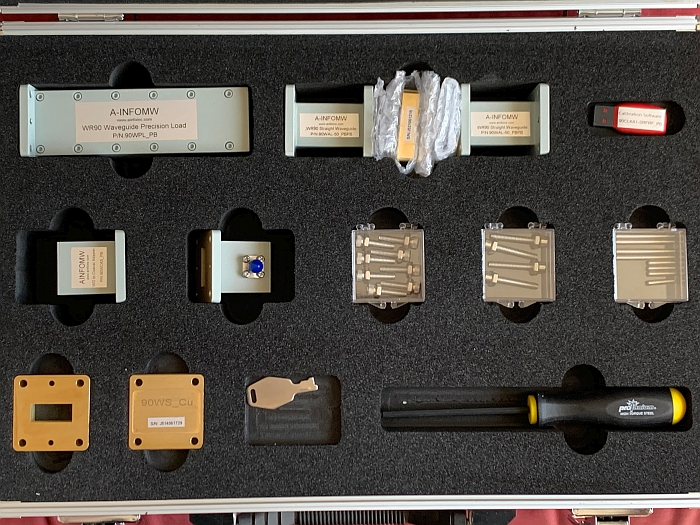
The Agilent DSAX91604A is a 16 GHz real time oscilloscope with 4 analog channels. 256-level intensity-grading emphasizes signal anomalies by lightly-shading infrequent waveforms. Agilent DSA oscilloscopes come with 50 Mpts memory and built-in software (EZJIT, EZJIT Plus, EZJIT Complete, and Serial Data Analysis). The three EZJIT software packages provide jitter analysis capabilities and jitter measurement floor of 100 fs. The equipped Infiniiscan option enables triggering on unique events such as zones on multiple channels and non-monotonic edges. Agilent N5449A High-Impedance Adapters are included for probes that require a 1 MΩ interface.
WR90 Waveguide and Calibration Kit Read More »
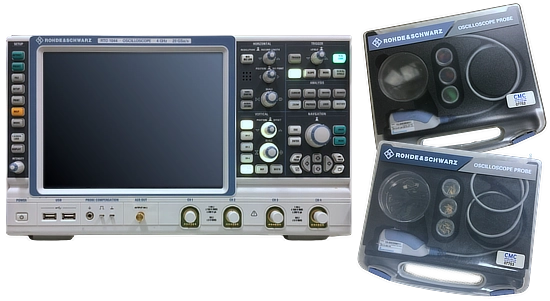
The Agilent DSAX91604A is a 16 GHz real time oscilloscope with 4 analog channels. 256-level intensity-grading emphasizes signal anomalies by lightly-shading infrequent waveforms. Agilent DSA oscilloscopes come with 50 Mpts memory and built-in software (EZJIT, EZJIT Plus, EZJIT Complete, and Serial Data Analysis). The three EZJIT software packages provide jitter analysis capabilities and jitter measurement floor of 100 fs. The equipped Infiniiscan option enables triggering on unique events such as zones on multiple channels and non-monotonic edges. Agilent N5449A High-Impedance Adapters are included for probes that require a 1 MΩ interface.
Rohde & Schwarz RTO1044 Digital Oscilloscope Read More »