CAD

Support Note: Synopsys® Multiphysics EDA University Bundle Release Notes

The Synopsys® Multiphysics EDA University Bundle Research notes present the latest information on products available to Subscribers for multiphysics simulation—including electromagnetic, thermal, and mechanical effects—for semiconductors including multi-die design and analog/mixed-sign design. For more information about the CAD software we license and our related services, please contact [email protected].

Support Note: Synopsys® Multiphysics EDA University Bundle Release Notes Read More »
Support Note: Synopsys® 2026 Global University Tools Bundle Release Notes

The 2026 Synopsys® Global University Tools Bundle Release Notes present the latest information for the 2026 academic program licenses available to Subscribers, including products added, removed, current products and add-on bundles. For more information about the CAD software we license and our related services, please contact [email protected].

Support Note: Synopsys® 2026 Global University Tools Bundle Release Notes Read More »

Support Note: Synopsys® RedHawk-SC University Bundle Release Notes

The Synopsys® Redhawk-SC University Bundle Release Notes present the latest information on products available to Subscribers for digital power integrity, EM/IR analysis, and dynamic voltage drop coverage for digital IP and SoCs. For more information about the CAD software we license and our related services, please contact [email protected].

Support Note: Synopsys® RedHawk-SC University Bundle Release Notes Read More »

Support Note: Information about Siemens EDA CAD Software Leased by CMC Microsystems

Summary Siemens EDA CAD software is a diverse group of design and simulation tools. Products across the vendor’s platform are offered in six distinct HEP bundles. To derive full benefit from their use, a CMC client should know how to configure a workstation that enables their best performance. The following is a list of reference

Support Note: Information about Siemens EDA CAD Software Leased by CMC Microsystems Read More »

Support Note: Information about Keysight PathWave University Educational CAD Software Leased by CMC Microsystems

Summary Keysight EDA software is a related collection of electronic design and modelling tools encompassing measurement to full layout analyses. CMC Microsystems staff leases features for the software programs in the vendor’s PathWave University Educational Support program. Bundle Contents Circuit Design Advanced Design System (ADS) RF Synthesis (Genesys) RF Circuit Simulation (Nexus) RFIC Design (GoldenGate)

Support Note: Information about Keysight PathWave University Educational CAD Software Leased by CMC Microsystems Read More »

Support Note: IntelliSuite CMC Turbo Cloud Access

Tool Modules The following IntelliSuite CAD tool modules are available on the CMC Turbo Cloud: 3D Builder Blueprint EDA Linker FabSim IntelliEtch IntelliFab JobManager MeshManip Parametric Designer Synple TapeOut TEM-PreProcessor Thermo-Electro-Mechanical VisualEase To sort all IntelliSuite modules, set the sorting filter to IntelliSuite. Helpful Resources IntelliSuite provides application notes and user manuals for all modules.

Support Note: IntelliSuite CMC Turbo Cloud Access Read More »

Support Note: How to Install CAD Software on a Linux Operating System

Several steps are involved when setting up your own Linux workstation for use with CAD software. CMC Microsystems provides the following advice for our clients’ reference. Check Linux distribution compatibility for your CAD software. Check hardware requirements for your CAD software. Check to see if CADpass client is compatible with your Linux distribution. Check other

Support Note: How to Install CAD Software on a Linux Operating System Read More »

Support Note: Regarding Our CAD Software Inventory and the Apple macOS Operating System

CMC Microsystems’ CAD support staff has been asked to provide a list of CAD programs that we license for our clients using the Apple macOS operating system. As of this date of publication, the following support certain macOS releases: COMSOL Multiphysics Product Suite:https://www.comsol.com/system-requirements National Instruments LabVIEW:https://www.ni.com/en/shop/software-portfolio/platform-roadmap.html Alternatives for Subscribers As part of your subscription, you

Support Note: Regarding Our CAD Software Inventory and the Apple macOS Operating System Read More »

Quick Start Guide: Getting Started with CMC Turbo Cloud

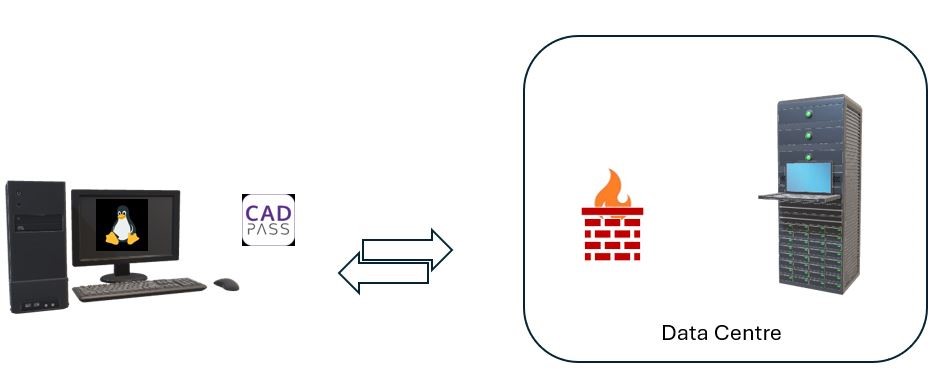
CADpass Client Secure Connection (will be referred to as CADpass Client or CADpass in this document) is a utility provided by CMC Microsystems that creates a secure connection between client PC’s, workstations, and computer sessions, and the CMC-managed infrastructure.   Accessing CMC Turbo Cloud  To log in to CMC Turbo Cloud Go to https://turbo.cmc.ca Log in using your CMC

Quick Start Guide: Getting Started with CMC Turbo Cloud Read More »

CMC Cloud Cadence iLS Series: Virtuoso® Layout Design Basics (VLDB) vIC 6.1.7 (Course ID: 84460EC)

Table of Contents This document is a companion document for the Cadence iLS training course Virtuoso® Layout Design Basics (VLDB) vIC 6.1.7. It is meant to be reviewed, along with the training course materials from Cadence, for how to complete the lab materials using the CMC cloud. For information on getting access to Cadence iLS

CMC Cloud Cadence iLS Series: Virtuoso® Layout Design Basics (VLDB) vIC 6.1.7 (Course ID: 84460EC) Read More »

Presentations from “Configure Your Research Platform: Infrastructure Needs for Embedded and Heterogeneous Computing”

During March and April 2018, CMC organized several one-day interactive seminars to explore research infrastructure requirements for heterogeneous computing implementations from small, low power sensor nodes, to network edge devices to the cloud. Specific infrastructure topics included needs and specifications for tools and platforms for: Application-Specific Instruction Set Processors (ASIPs) and hardware accelerators Open-source processor

Presentations from “Configure Your Research Platform: Infrastructure Needs for Embedded and Heterogeneous Computing” Read More »

Using CMC Cloud Design Environment – Windows

Table of Contents Introduction CMC cloud design environments are virtual on-demand secure design environments. These environments include CAD tool suites and can host Process Design Kits (PDKs). This document guide you to use CMC cloud where you can perform your research. Accessing CMC cloud Access to CMC cloud is included with many of the CAD Tools available

Using CMC Cloud Design Environment – Windows Read More »

How to Remove the AppGate Icon from Your Desktop (to remove java web start cached apps)

After installing the new version of CADpass, I no longer have an icon on my desktop or the icon on the desktop doesn’t work. How do I fix that? (To remove a java web start cached apps). 1. Go to the Windows Control Panel – and open the Java Control Panel. 2. Click Settings. 3.

How to Remove the AppGate Icon from Your Desktop (to remove java web start cached apps) Read More »

How to SFTP with CMC to Upload a Video for Symposium

End user upload and download file instruction Windows user: To connect to SFTP server from a Windows system, the user must use a SFTP client software. i.e. FileZilla, MobaXterm, WinScp, etc. This is free software that you can download from the Internet. Host: sftp://cmc-fab-01.cmc.ca (make sure you copy this url) Username: your CMC registered username Password: your CMC login

How to SFTP with CMC to Upload a Video for Symposium Read More »

Setting the Temporary/Scratch Directory for Ansys Simulations (CMC Cloud)

Table of Contents Our subscribers are able to use our virtual Linux Cloud (VCAD) accounts hosted here in Kingston, Ontario, if they do not have access to certain CAD tools at their home universities. Figure 1 shows the CMC Microsystems’ Cloud account hardware configuration. These accounts have recently been assigned additional master disk space for

Setting the Temporary/Scratch Directory for Ansys Simulations (CMC Cloud) Read More »

Quick Start Guide: Using CMC Cloud VCAD Design Environments

Introduction CMC cloud VCAD instances are virtual on-demand secure design environments based on the Linux operating system. These environments include CAD tool suites and can host Process Design Kits (PDKs). This document is a guide for you to use the CMC cloud in which you can perform your research activities. Accessing CMC VCAD cloud Access

Quick Start Guide: Using CMC Cloud VCAD Design Environments Read More »

Sustainable Technology Configuration (STC)

The CMC Sustainable Technology Configuration contains: A collection of CMC-managed and CMC-supported software components used for CAD tools, design kits, scripts, and license access A distribution mechanism for delivery of the software components to members universities More information about the CMC STC: All CAD software in the Sustainable Technology Configuration runs on Linux operating systems. The STC

Sustainable Technology Configuration (STC) Read More »

CADpass™

  CADpass Client Download for Subscribers CADpass Client Download for VIE Members Getting Started Quick Start Guide: CADpass client for Windows Quick Start Guide: CADpass for Linux Quick Start Guide: CADpass for MAC Resources Licensing Information CAD Tool Quick Start Guides FAQ for CADpass

CADpass™ Read More »

Novel transceiver paves the way for a battery-less future

A fresh approach to wireless transceiver design has helped École de technologie supérieure professors Frederic Nabki (bottom right) and Dominic Deslandes (bottom centre) develop a new technology with dramatically lower energy requirements, offering potential for devices that never need recharging Their chip is now being commercialized by their startup company, SPARK Microsystems. Other team members, from left to right include Rabia Rassil, Antoine Collerette, Gabriel Morin-Laporte and Michiel Soer.

Novel transceiver paves the way for a battery-less future Read More »

Scroll to Top

Challenges Announcement.

FUNDING

Skip to content